SanUSB
ESP Cloud Update
Solution
How?
Starting the update
ESP Cloud Update
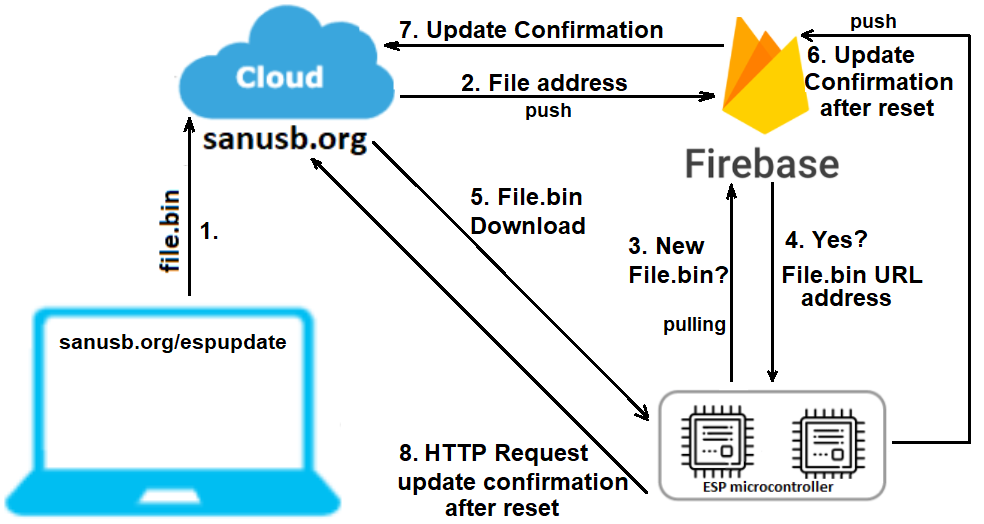
How to make a firmware update for ESP32/ESP8266 over the internet in a simple way???
Solution
Use this platform.It is free and easy to implement the update.
How?
Download and install the Firebase and EspCloudUpdate .zip libraries available on:
https://github.com/SanUSB/EspCloudUpdate
To install the library, follow the steps: Arduino IDE -> Sketch -> Include Library -> Add .zip Libraries.
Unzip the .zip folder and open the example CloudUpdateStart.ino. Write the name of your profile and WiFi network in the sketch.
Update the sketch only the first time using the USB port. So it is now possible to transfer over the internet generating the .bin file.
For this, go to Sketch menu of the Arduino IDE > Export compiled Binary.
Tutorial video
Starting the ESP cloud update
Type the same name as your sketch profile (without /):
File (.bin):
Tutorial video